
What it is
A business management system is where the invoices, receipts, clients and expenses live. On most days, working in it is a series of forms: find the client, choose the document type, fill in the lines, choose the payment method, check, issue.
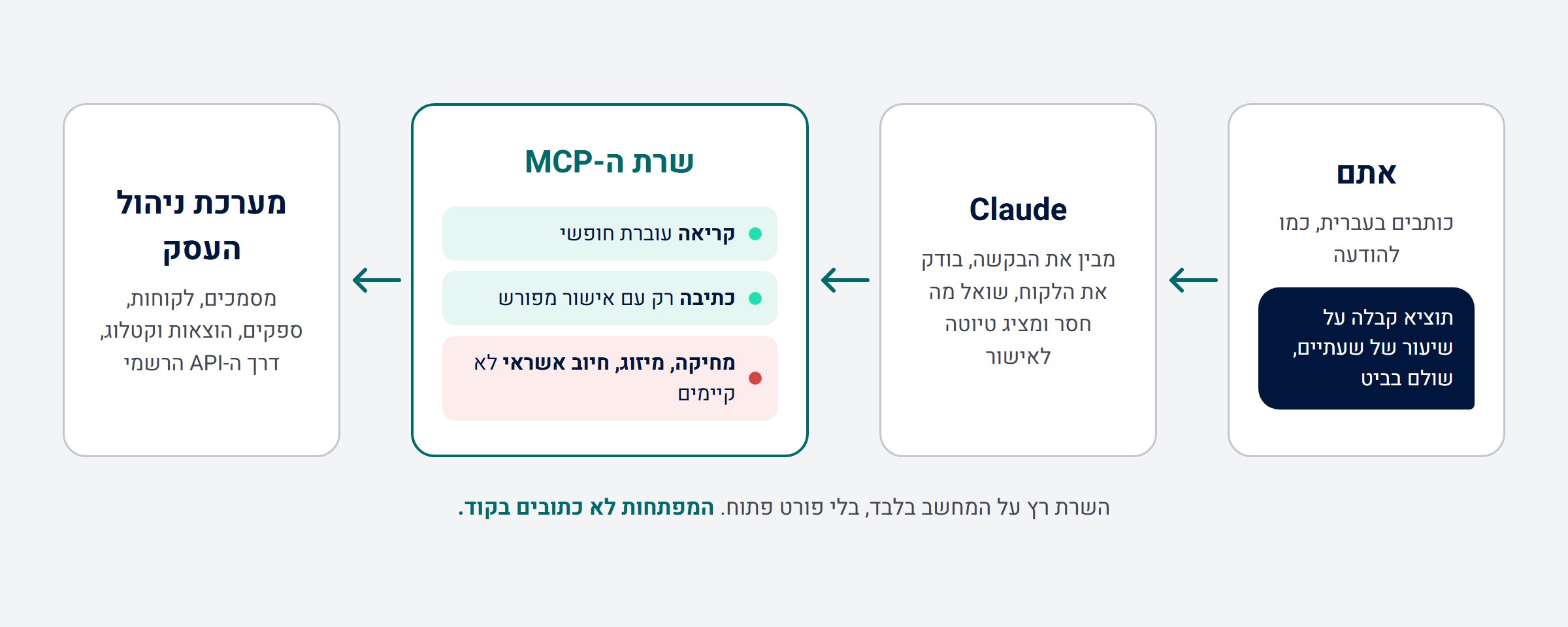
I built an MCP server that connects Claude directly to the system's API, and I built it with Claude Code. MCP (Model Context Protocol) is an open standard through which a language model gets real tools to work with, not just text to read. Once the server is connected, you can simply write:
- "Issue a receipt for a two hour private lesson, paid with Bit"
- "Open a new client with this phone number"
- "What's still outstanding this month?"
- "Record an expense for a supplier"
And the agent does the work in the system itself, with the business's real data.
What working with it looks like
Issuing a receipt, for example, is not a single command but a short conversation, and that is deliberate:

- The agent looks up the client in the system, so as not to create a duplicate.
- It drafts the document and shows it: client, description, quantity, amount.
- If a detail the document requires is missing, such as the payment method on a receipt, it asks instead of guessing.
- It produces a preview of the real document, exactly as it will look, without saving anything in the system.
- Only after explicit approval does it issue the document, and it returns a download link.
This matters especially here, because an issued tax document cannot be deleted. It can only be cancelled with a counter document. That is why the whole server is built around "see it first, issue it after".
And it doesn't just carry out commands. Already in its first review of the documents, the agent noticed an old proforma invoice that had stayed open after being merged into a new one, so the client's balance was showing higher than it really was. It suggested closing it, and explained beforehand that closing deletes nothing and does not issue a new document.
What it can do
Seven tools, with about forty actions between them:
| Area | What you can do |
|---|---|
| Documents | Search, retrieve, preview, issue, close and reopen, linked documents, download links, payment search |
| Clients | Search, retrieve including balance, open, update and assign documents |
| Suppliers | Search, retrieve, open and update |
| Expenses | Search, scanned drafts, record, update, close and reopen |
| Catalog | Items and services for reuse in documents |
| Reference data | Cities, countries, exchange rates and business categories |
| Open tool | Controlled access to the rest of the API, under the same approval and blocking rules |
Safety is part of the design, not an add on
Giving a language model access to a business's real account is not something to do lightly. That is why the server is built in layers:
- An approval gate in the code. Every action is defined as a read or a write. A write action is rejected by the server itself if it did not arrive with explicit approval, and the model is instructed to show the user the exact details before sending it. Any new action defined as a write gets the gate automatically.
- Destructive actions simply don't exist. Deletions, merging records, charging credit cards and creating payment forms exist in the API, but not in this server. They were left out on purpose, and the open tool blocks them too.
- A separate test environment. One switch moves the whole server to a test account, and every response in that mode is labeled, so there is no way to confuse a test with the real thing.
- The keys are not in the code. They are read from a local environment file that is never committed to version control and never copied into Claude's configuration files.
- Runs only on your computer. The server connects over a local channel (stdio): the app starts it as a process and talks to it directly. It opens no port and accepts no outside connections.
And there is a limit worth saying out loud: the approval gate protects against a mistake by the model, not against a hasty approval by a person. And when the same conversation also reads outside content, such as an email or a website, malicious text in that content can try to steer the agent. That is why every action that changes something goes through a person, and none of them is set to be approved automatically.
Under the hood
- OAuth authentication with early renewal. The server receives an access token valid for an hour, keeps it in memory and renews it two minutes before it expires, so it won't fail in the middle of an action. Several requests arriving together are merged into a single renewal, instead of each one asking for its own token.
- Verified against the official spec. Every route was checked against the system's OpenAPI specification. Along the way it turned out, for example, that the authentication server sits at a completely different address from the API itself, and that older versions of the documentation use different field names. A detail like that is the difference between a server that works and one that returns an authorization error with no explanation.
- All the tools are generated from a single map. The actions are defined in one file, as a table: the request type, the route, whether it is a write, and a description the model sees. From that, the server builds the tools, the documentation the model receives and the approval gate. Adding an action is a single entry.
- Descriptions written for the model. The description of each action is part of the engineering. Not every business is allowed to issue every document type, so the description tells the model to check first which types are open to the business. And an action whose name sounds like a read, but which actually recalculates and updates a balance, is explicitly marked as a write.
- Errors you can act on. When a request fails, the server extracts the real error message from the response and returns it with the environment and the status code, so the model knows what to fix instead of just trying again.
- One file, no installation. The server is bundled with all its dependencies into a single JavaScript file. Node.js is all you need to run it.
- A connection check before anything else. A separate script runs five read only checks: authentication, document types, document type details, client search and document search. It changes nothing, and tells you exactly what isn't working.
Where it works
In any app that supports local MCP: Claude Code, the regular chat in the Claude desktop app, and code editors such as Cursor or VS Code. The same server, the same setup.
The technology behind it
| Layer | Technology |
|---|---|
| Development | Built with Claude Code |
| Protocol | Model Context Protocol, through the official SDK |
| Language and runtime | JavaScript on Node.js, with no dependencies beyond the SDK |
| Authentication | OAuth 2.0 (client credentials), with in memory caching and early renewal |
| Connection | Local stdio, no open port |
| Packaging | esbuild into a single file |
| Safety | An approval gate for writes, destructive actions kept out of the server, a labeled test mode |
Want a connection like this?
Almost every system a business works in has an API: invoicing, CRM, calendar, inventory. An MCP server turns it into a tool the agent knows how to use, in plain language, with safety rules that fit the way your business works. If there is a system where you spend an hour a day on forms, you can probably just talk to it.